Showing posts with label jQuery Plugins. Show all posts

Friday, December 6, 2019

jQuery Plugin to create Custom Animations

This review brings to you a free jQuery Plugin to create Custom Animations to be used into your Website , for both mobile and desktop displays . If you need some HTML5 specific animation to show your own customized reactions to the User's interactions, you can create your own jQuery animation and use it again and again:


Custom FREE  jQuery Plugin for creating custom Animations at runtime

jQuery Plugin to create Custom Animations

jQuery Plugin to create Custom Animations


jQuery Plugin to create Custom Animations


1) Using the present jQuery plugin, you can create your own Custom Animations and use them in your website. 
2) This jQuery plugin includes support for all CSS3 changes
3) Also includes callback functions and speed settings.
This Plugin can be get from the following GitHub repository:
https://github.com/CarmelSoftware/jQueryPlugin_CustomAnimation


The Plugin usage is explained in the following Tutorial:

Snapshots: mobile devices :

jQuery Plugin to create Custom Animations

jQuery Plugin to create Custom Animations

desktop machines :


jQuery Plugin to create Custom Animations


Plugin Utilization:

This jQuery Plugin for Custom Animations can be used as follows:

1) Custom animation creation  :

jQuery Plugin to create Custom Animations


2) How to use the custom jQuery plugin in the code:

jQuery Plugin to create Custom Animations


by Carmel Schvartzman - The MVC Club - The HTML5 Club


פיתוח: כרמל שוורצמן


Thursday, August 6, 2015

jQuery Plugin to serialize an HTML5 Form into a JSON object


jQuery Plugin to serialize an HTML5 Form into JSON

by Carmel Schvartzman - The MVC Club


A custom jQuery Plugin for serializing a Form into a JSON object to send in an HTTP request to the server.
This elegant Plugin is a high performance code to transform the data inside an HTML5 Form , into a JSON object serialized to a string. This string can then be sent inside the body of an HTTP POST, HTTP PUT or HTTP PATCH request, in order to be preserved in some database at server side.
This jQuery plugin can be referenced by an MVC View, and of course can be used by any HTML5 web page.
Requisites:
1) your HTML5 web page has to reference the jQuery framework
2) only the fields that have a "name" attribute will be serialized in a JSON object. All other fields that you don't want to serialize, such as hidden identity fields and anything like that, will be ignored.
The requisites for the Form input fields serialization are according to the www.w3.org Recommendation on web Forms .
This plugin uses jQuery utilities such as the serializeArray method .
This Plugin can be downloaded from the following GitHub repository:
https://github.com/CarmelSoftware/jQueryPlugin_FormSerializer

Snapshots:


The Form is serialized into the JSON object as follows:


Usage:

This utility jQuery Plugin is used as follows:


The Plugin's code :


All the Form's fields have to have a "name"  :


The Plugin usage is explained in the following Tutorial:
By Carmel Schvartzman

Enjoy MVC !!!


פיתוח: כרמל שוורצמן

Wednesday, May 13, 2015

Build a customizable jQuery Plugin for HTML5 Form

In this post we describe Step by step How to Build a customizable jQuery Plugin for HTML5 Form.
In this article we create from scratch a custom jQuery Plugin to display an HTML Form with text, file, number, email, etc input types and radiobuttons at your wish, using Twitter Bootstrap CSS3 styles . The Form will contain any input types (text, email, number, date, color, file, hidden, datetime, button) and labels as you wish, being fully customizable.
The complete code can be found in this GitHub repository:
https://github.com/CarmelSoftware/jQueryPlugin_CustomizableForm

Our jquery plugin will shows an HTML5 form as follows:

Build a customizable jQuery Plugin for HTML5 Form
The code to produce that completely customizable form is just this:

Build a customizable jQuery Plugin for HTML5 Form  1


How to Build a customizable jQuery Plugin for HTML5 Form 


First , we have to reference to the jQuery and the CSS3 Bootstrap style  files, so browse to http://jquery.com/download/ and to  the  Bootstrap's official web site to get the latest versions of the frameworks in CDN(Content Delivery Network):
Build a customizable jQuery Plugin for HTML5 Form   2


Build a customizable jQuery Plugin for HTML5 Form    3


Add the references to the head element in a new HTML5 file   :
Build a customizable jQuery Plugin for HTML5 Form    4

Notice that we also included inside the "head" tag  two new files: one for the  style , and the other one will hold our jQuery plugin.
Next, we code a div to contain the web Form produced by our jquery plugin:
Build a customizable jQuery Plugin for HTML5 Form    5


After the body element, append a script element to call our plugin:
Build a customizable jQuery Plugin for HTML5 Form   6


Now, go to the "jqueryplugin.js" javascript file and write the plugin definition  as follows:
Build a customizable jQuery Plugin for HTML5 Form    7

The $.fn.Form is our jQuery plugin, and the defParams will hold the defaults to construct it, as follows:
Build a customizable jQuery Plugin for HTML5

Why? In case the plugin get no parameters, we apply the defaults.
Else, we merge the received arguments with the defaults, using the jQuery $.extend() method as this:

Build a customizable jQuery Plugin


Now we add the HTML5 Form to "this", which is the container where our plugin will be located:

Build a   jQuery Plugin for HTML5 Form

We included a Bootstrap class for the style, and the action where to send the request will be set by the user.
We add a Title to the Form:


 customizable jQuery Plugin for HTML5 Form


And a first div, which will hold all input elements:

  jQuery Plugin for HTML5 Form

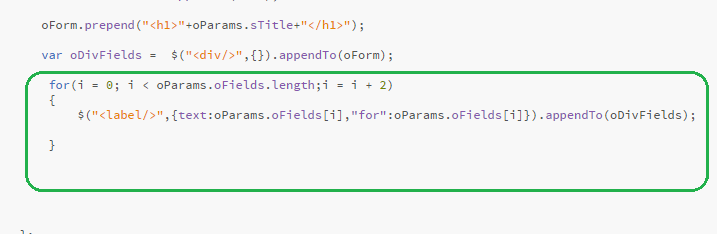
Now we make a loop for craeting the labels for the Form's fields, following the oFields array:

 Plugin for HTML5 Form

Next, we build all input elements according to the array oFields, which contains them in the form of element-name + element-type : "Attachment","file" :


 HTML5 Form

Then, we do the same for the array of radio buttons, inserting input radiobuttons and its labels, by looping on the oRadio array and appending them to a new <div> element::


Build a customizable  Plugin for HTML5 Form


Finally, we append another <div> with two buttons, a Reset and a Submit one:

Build a customizable  HTML5 Form

At the end of our jquery plugin, we type a return expression , to allow jquery chaining on our custom plugin:

return this;

And our runtime made HTML Form will appear as this:

Build a   jQuery Plugin     Form


Build a customizable jQuery

Also, we code the following CSS3 style to the styles.css file:


Build


Hoping this post was useful to you,

Happy programming with jQuery.....

      by Carmel Schvartzman


כתב: כרמל שוורצמן

Wednesday, May 6, 2015

Custom jQuery Plugin to display a Form using Twitter Bootstrap

In this post we describe Step by step How to Build a Custom jQuery Plugin to display a Form using Twitter Bootstrap.
In this article we build a custom jQuery Plugin to  display :
- a customizable HTML Form with all input types as required (including text, email, number, date, color, file, hidden, datetime, button input types)
- fully customizable style , with the defaults using Twitter Bootstrap CSS3 styles .

The complete jquery plugin can be downloaded from this GitHub repository:
https://github.com/CarmelSoftware/jQueryPlugin_CustomizableForm

This custom jquery plugin will display by default a HTML5 form like this:

Custom jQuery Plugin to display a Form using Twitter Bootstrap
 The javascript to display this form is just this:

Custom jQuery Plugin to display a Form using Twitter Bootstrap       1


How to Build a Custom jQuery Plugin to display a Form using Twitter Bootstrap 


We start by adding references to the jQuery and to the CSS3 Bootstrap style  frameworks. Therefore  browse to http://jquery.com/download/ and to  the  Bootstrap's web site and get the latest releases in CDN(Content Delivery Network):


Custom jQuery Plugin to display a Form using Twitter Bootstrap       2


Then add those links, and  also two new files (one for the  style , and the other one will hold our jQuery plugin) to the head element in a new HTML5 file   :

Custom jQuery Plugin to display a Form using Twitter Bootstrap        4

 Add a div to hold the web Form produced by our jquery plugin:

Custom jQuery Plugin to display a Form using Twitter Bootstrap       5


After the body element,  call the plugin:

Custom jQuery Plugin to display a Form using Twitter Bootstrap       6


Open the "jqueryplugin.js" javascript file and write an object to contain all defaults for our plugin:

Custom jQuery Plugin to display a Form using Twitter Bootstrap       7

Notice the classes properties , holding Twitter Bootstrap definitions.
Now  code the plugin as follows:
jQuery Plugin to display a Form using Twitter Bootstrap


First thing our plugin will do is to merge the received arguments with the default ones, by using the jQuery $.extend() method  .

Next we create the Form using jQuery, and setting its style and action parameters:

Plugin to display a Form using Twitter Bootstrap


We also added the Form's Title .

Then we loop over the oFields array, which contain the required input elements to be created together with the labels for its names:

display a Form using Twitter Bootstrap

Also we added the style.
Take a look at that array, and you will see that it contains the required input elements in the form of element-name + element-type like this :  "Attachment","file" .
Then we do the same with the oRadio array containing the radio buttons if required,  inserting  radiobuttons and its labels as follows,  looping over the collection and appending the created elements to a new <div> :

Form using Twitter Bootstrap


Finally, we add a <div> holding two buttons, for Resetting  and for Submitting the Form:

using Twitter Bootstrap


Our jquery plugin will return the "this" instance, to allow jquery chaining for it:

Twitter Bootstrap


And our runtime fully customizable HTML5 Form will show as this:

Custom jQuery Plugin to display a Form using Twitter

Custom jQuery Plugin to display a Form using Bootstrap


Also, we code the following CSS3 style to the styles.css file:
Custom jQuery Plugin to display a Form


We hope that this article was useful to you.
Happy programming with jQuery.....

      by Carmel Schvartzman


כתב: כרמל שוורצמן