Showing posts with label Entity Data Model. Show all posts

Monday, April 27, 2015

How to Fix the OptimisticConcurrencyException in MVC

In this post we describe Step by step How to Fix the OptimisticConcurrencyException in MVC.  
We take care here in just 5 minutes of the errors raised by the Entity Framework while the EDM (Entity Data Model) is confronting a database concurrency issue.

In short, when two or more users try to modify data simultaneously , SQL offers two types of Concurrency Control:
1) Pessimistic Concurrency : lock the data table in advance because someone for sure will try to   affect your changes simultaneously. Action to perform: LOCK the table!
2) Optimistic Concurrency : make your changes and let's hope none will try to alter the record in the meantime. Action to perform: raise an error if the record was altered in the meantime!

Our approach here will be: if indeed the record was altered from the original (AKA the "OptimisticConcurrencyException" was thrown), then we'll refresh the data and save your important updates with a "Client Wins" policy.


How to Fix the OptimisticConcurrencyException in MVC


To apply our approach, we'll use here a "Save(object itemToSave, int #noOfItemsToSave )" method, wrapping the context's SaveChanges().
We just add here a "catch" block to the C# method which tries to update an item to the database.
This way we enforce refreshing the item and saving all your changes overriding the refreshed data.
Therefore, add the following method to your Data Repository (copy-paste:) :

public bool Save(object target, int RecordsNumber)
        {
            try
            {
                return Context.SaveChanges() == RecordsNumber;
            }
            catch (OptimisticConcurrencyException)
            {
                ObjectContext ctx = ((IObjectContextAdapter)Context).ObjectContext;
                ctx.Refresh(RefreshMode.ClientWins, target);
                return Context.SaveChanges() == RecordsNumber;
            }
        }


As you see, the return value tells that all edited items have been successfully persisted to database.
Then you can use this method from your MVC Controller as follows:


 [HttpPost]
        [ValidateAntiForgeryToken]
        public ActionResult Edit(Blog blog)
        {
            if (ModelState.IsValid)
            {
                db.Update<Blog>(blog);
                db.Save(blog, 1);
                return RedirectToAction("Index");
            }
            ViewBag.BloggerID = new SelectList(db.Retrieve<Blogger>(null), "BloggerID", "Name", blog.BloggerID);
            return View(blog);
        }


Happy programming.....

      by Carmel Schvartzman


כתב: כרמל שוורצמן


Friday, January 9, 2015

How to Fix the Entity Framework error "Problem in mapping fragments"


In this article we see How to Fix the Entity Framework error "Problem in mapping fragments" : "Non-nullable column  is mapped to a nullable entity property" :


How to Fix the Entity Framework error "Problem in mapping fragments"


 How to Fix the Entity Framework error "Problem in mapping fragments"


This Entity Framework error is originated when your Data Model contains an Entity with a nullable property , while at the Data Store, the mapped column has been defined as non-nullable.
Let's see the Error Message : some "Non-nullable column" has been mapped to a  "nullable entity property" , therefore let's locate at the Model (not at the "Store") that property : in our case, is the property "name" :

How to Fix the Entity Framework error "Problem in mapping fragments"  1


Now we open the "Details" window to take a look at the property :
How to Fix the Entity Framework error "Problem in mapping fragments"  2

We find there that the Entity Model property mapped to the non-nullable column , has not set the "Nullable" field.

So set it in the way that conforms to the Store's column definition:
How to Fix the Entity Framework error "Problem in mapping fragments"  3


After that, you can "validate" the Entity Data Model by right clicking on the property :

How to Fix the Entity Framework error "Problem in mapping fragments"  4

In this case, because there is only one property wrongly mapped, the Data Model is validated with no errors:
How to Fix the Entity Framework error "Problem in mapping fragments"  5


By Carmel Shvartzman

עריכה: כרמל שוורצמן

Wednesday, November 26, 2014

How to use ExecuteStoreQuery with parameters on the Entity Framework


This tutorial is an example of  How to use the ExecuteStoreQuery method with parameters on the  Entity Framework, thus directly executing SQL commands against the Model Data Source.
We'll use a stored procedure that takes in a string parameter and returns some records, which we'll store inside a generic List<>. Using SQL commands or stored procedures is an effective way to retrieve only the records that you need, instead of fetching ALL the table data, to apply on it some kind of filtering using Where() or Single() methods, with all the performance costs that this later imply.

We'll exemplify running commands against the database on two ways:
1) using Stored Procedures
2) using an SQL command


 How to use ExecuteStoreQuery with parameters on the Entity Framework


1) For our first example, we create a stored procedure which takes a parameter and return three records using the received argument:

How to use ExecuteStoreQuery with parameters on the Entity Framework


Next, we define an SqlParameter for sending some text to the procedure:
How to use ExecuteStoreQuery with parameters on the Entity Framework 1

 SqlParameter p_code = new SqlParameter("code", "TEST");
            List<string> resultComplaintStateCode =
                                (from c in  Context
                                     .ExecuteStoreQuery<string>("GetText @code" ,p_code
                                 )
                                 select c).ToList();


 Notice that we use Linq to insert the returned records inside a generic List<> :

How to use ExecuteStoreQuery with parameters on the Entity Framework 2


Is really straightforward. However, if you use ExecuteMethodCall() method instead of ExecuteStoreQuery(), you'll need to update the Entity Framework Data Model, importing the stored procedure:
How to use ExecuteStoreQuery with parameters on the Entity Framework 3


How to use ExecuteStoreQuery with parameters on the Entity Framework 4


2) As the ExecuteStoreQuery method's name implies, we can also use it to execute some SQL command against the database.
For instance, let's copy the same SQL code from the stored procedure, and execute it directly from the C# code:
How to use ExecuteStoreQuery with parameters on the Entity Framework 5


 As you see, the SQL command was executed according to the three parameters that we sent :

How to use ExecuteStoreQuery with parameters on the Entity Framework 6


That's all!!!!


By Carmel Shvartzman

עריכה: כרמל שוורצמן

Tuesday, June 3, 2014

Step By Step How to create a Generic Data Repository in ASP.NET MVC 4

         By Carmel Schvartzman

In this tutorial we'll learn how to create a Generic Data Repository in ASP.NET MVC 4. This MVC C# code example can be downloaded from the following GitHub repository:
https://github.com/CarmelSoftware/Generic-Data-Repository-for-ASP.NET-MVC
A Wiki page is here:
https://github.com/CarmelSoftware/Generic-Data-Repository-for-ASP.NET-MVC/wiki
A Data Repository is a class designed to implement the Repository Pattern. This software pattern was designed in order to access, cache in memory and persist in the database the application data.  Thus the repository will support all CRUD operations (Create Retrieve Update Delete) enhancing a clear separation between data domain and database.
There exist Repository implementations with the use of data caching. The caching only stands to avoid unnecessary round trips to the SQL server. But when scalability of the sites is on the stage, may be we don't want to choke our web server's memory. Then, caching is not only redundant, but also dangerous as a waste of the web server resources.
In this tutorial we'll add GENERIC Repository functionality (no caching) to a new ASP.NET MVC 4 app.
That means, our Repository will offer all CRUD functionality, using the same GENERIC methods for all classes.
In successive tutorials, we'll use this Generic Data Repository to build MVC Applications as the following :


Let's say we have an MVC internet application with an Entity Data Model mapped to an SQL server database. This EDM maps just two entities: Blog and Comment:
Generic Data Repository in ASP.NET MVC 4

We'll develop a GENERIC Data Repository which will support ALL model entities in our application.
First, create a new class in the Model folder, name it "Repository", and type the following EDM context instantiation:

Data Repository in ASP.NET MVC 4

 public class DataRepository : IDisposable
    {
        #region Context
        private BlogEntities _Context;
        public BlogEntities Context
        {
            get
            {
                if (_Context == null)
                {
                    _Context = new BlogEntities();
                }
                return _Context;
            }

        }
        #endregion
Next, create the SAVE method, as follows:
Generic Repository in ASP.NET MVC 4

 public bool Save(object target, int RecordsNumber)
        {
            try
            {
                return Context.SaveChanges() == RecordsNumber;
            }
            catch (OptimisticConcurrencyException)
            {
                ObjectContext ctx = ((IObjectContextAdapter)Context).ObjectContext;
                ctx.Refresh(RefreshMode.ClientWins, target);
                return Context.SaveChanges() == RecordsNumber;
            }
        }

        public void Dispose()
        {
            if (Context != null)
            {
                Context.Dispose();
                GC.Collect();
            }
        }
As you see, we have a response in case of a concurrency exception. Optimistic Concurrency Exception means, we are optimistic in supposing that the current record being updated by us, is not being changed by anybody else. But, if at the moment we SAVE the record, the Entity Framework realize it has been changed in the meantime by somebody else, it will not allow us to save, but will throw an OptimisticConcurrencyException instead. What we do here, is REFRESHING the entity (getting the updated record) , state that CLIENTWINS over the data store (meaning that OUR changes override the record from database), and then SAVE it again.
Notice that we CAST the DbContext in an ObjectContext, in order to REFRESH the data.

Now let's code the complete C.R.U.D. (Create Retrieve Update Delete) operations, in a generic way:
Generic Data Repository

public void Create<T>(T entity) where T : class
        {
            Context.Set<T>().Add(entity);
        }
We typed a generic Create method using the generic Set<T>( ) method from the DbContext.
Now, Retrieve will support 3 cases :
   1) retrieve ALL records : if both parameters ID and PRED are empty : it's sensible, isn't it?
   2) retrieve just ONE record : if ID contains a value
   3) retrieve SELECTED records according to a PREDICATE : if the PRED parameter is set :
Data Repository ASP.NET MVC 4

public List<T> Retrieve<T>(int? Id, Func<T, bool> pred) where T : class
        {
            List<T> list = new List<T>();
            if (Id.HasValue)
            {
                list.Add(Context.Set<T>().Find(Id.Value));
            }
            else if (pred != null)
            {
                list = Context.Set<T>().Where(pred).ToList();
            }
            else list = Context.Set<T>().ToList();
            return list;
        }
Now for the UPDATE method, just get the local entry, and set its state to "modified" :

public void Update<T>(T entity) where T : class
        {
            var e = Context.Entry<T>(entity);
            e.State = EntityState.Modified;
        }
Finally, DELETE just removes the entity : 
Repository ASP.NET MVC 4
public void Delete<T>(T entity) where T : class
        {
            Context.Set<T>().Remove(entity);
        }
That's all the GENERIC Repository.

How to use it? Example of using it on a Controller:
Get ALL records : 
Generic Data Repository

Get a LIST of SOME records : 

Generic Data Repository in MVC 4

Get just ONE record : 
 CREATE a new record : 


UPDATE a record : 


DELETE a record :

 This is the complete Generic Data Repository code for you:
public class DataRepository : IDisposable
    {
        #region Context
        private BlogEntities _Context;
        public BlogEntities Context
        {
            get
            {
                if (_Context == null)
                {
                    _Context = new BlogEntities();
                }
                return _Context;
            }

        }
        #endregion
        ///////// GENERIC C R U D METHODS :
        public void Create<T>(T entity) where T : class
        {
            Context.Set<T>().Add(entity);
        }
        public List<T> Retrieve<T>(int? Id, Func<T, bool> pred) where T : class
        {
            List<T> list = new List<T>();
            if (Id.HasValue)
            {
                list.Add(Context.Set<T>().Find(Id.Value));
            }
            else if (pred != null)
            {
                list = Context.Set<T>().Where(pred).ToList();
            }
            else list = Context.Set<T>().ToList();
            return list;
        }
        public void Update<T>(T entity) where T : class
        {
            var e = Context.Entry<T>(entity);
            e.State = EntityState.Modified;
        }
        public void Delete<T>(T entity) where T : class
        {
            Context.Set<T>().Remove(entity);
        }
        public bool Save(object target, int RecordsNumber)
        {
            try
            {
                return Context.SaveChanges() == RecordsNumber;
            }
            catch (OptimisticConcurrencyException)
            {
                ObjectContext ctx = ((IObjectContextAdapter)Context).ObjectContext;
                ctx.Refresh(RefreshMode.ClientWins, target);
                return Context.SaveChanges() == RecordsNumber;
            }
        }

        public void Dispose()
        {
            if (Context != null)
            {
                Context.Dispose();
                GC.Collect();
            }
        }
    }


That's All !!!! 
In this tutorial we've learned how to create a  Generic Data Repository in ASP.NET MVC 4.  

Happy programming.....


כתב: כרמל שוורצמן

Monday, February 10, 2014

Step By Step How to create a DropDownList HTML Helper loaded from Database

        By Carmel Schvartzman
In this tutorial we'll learn how to create a dynamic DropDownList  HTML Helper in an MVC View  in ASP.NET MVC 4. This DropDownList will expose just a few items dynamically loaded from database and sent by the Action method on the web server.

An Html Helper is a class designed for rendering HTML controls to the Views. It supports several extension methods representing the different controls such as forms, textboxes, labels, dropdownlists, routelinks ( "< a >" ) , actionlinks ( "< a >" ) ,textareas, passwords, listboxes, checkboxes, radiobuttons, hidden fields, editors, and validation code.

We'll want to add a  DropDownList to the web page, as follows:


To use the HTML Helpers we must create our own View, so first let's create a new Controller called "NewViewController", and then add a View to the Index Action method. So right click over the Controllers folder, and add a new Controller:


Name it "NewViewController", and select the template "Empty MVC Controller":


Open the Controller file and find the "Index" Action method:


Right click on it and select the option "Add View":


On the dialog, let the name be "Index", select the "ASPX" View engine, and choose a master page:

The HTML Helper we'll learn about is the DropDownList control. For the other HTML Helpers, refer to the "Categories" Menu in the top-right place in this Blog. We'll use the Entity Framework Data Model and the Repository we created in a previous tutorial .  The repository exposes two Entities: Blog and Comment, with a one to many relationship between them. Open the View we just created, and type the TempData["message"] in order to display a message to the user:


Create the Form object taking care of its tags:


Also, add a button in order to submit the form:


Now, add the label which will inform the user what is the dropdownlist about:


Next, we'll add the DropDownList named "BlogPost", using an overload of the extension method with the following parameters:


The second parameter being an IEnumerable<SelectedListItem>, we'll leave it empty with a "null" value , to force the MVC framework to search the ViewBag (and therefore the ViewDataDictionary, because the ViewBag is just a wrapper of the ViewData)  for a key named "BlogPost" as the first argument tells, containing a SelectList of SelectedListItems, which soon we'll add to the Index Action method:


The third parameter is the text to display on the DropDownList , and the fourth is an anonymous object representing the CSS style:


Now for the code in the Action method, find the "Index" in the Controller, and add the code to populate the dropdownlist:


We just instantiate our Repository, and populate the SelectList with a Linq query retrieving the posts. Also, we set the Key and the Text for the SelectList, with the names of the properties we use as Key/Value, in this case, we use the "BlogID" and the "Title" properties.
Now build your application and browse to the "/NewView/Index" (or just "/NewView") web page:


We got this dropdownlist, and select the post with the Title "Sobralia Altissima" and the key "5":


Now, what happens when we press the Submit button? Let's take a look at the Network tab on the Developer's Tools (F12):
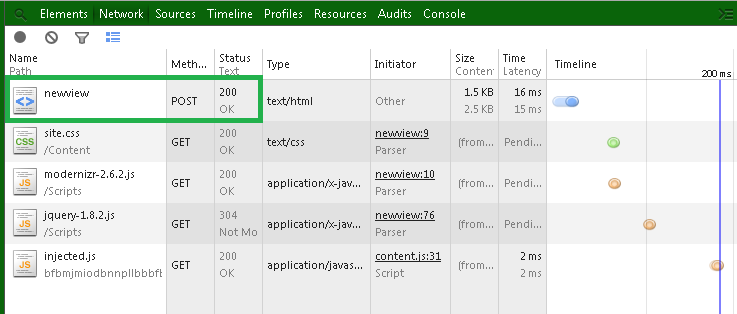

An HTTP POST request has been sent to the web server, containing the Form data , the key = "BlogPost" with the value = "5":


Therefore, we need to create a new Action Method at the "NewView" Controller to handle the HTTP POST request ( AcceptVerbs(HttpVerbs.Post) ), with the same name "Index" ( ActionName("Index") ). So add the following Action method with the "BlogPost" parameter:


Also, we'll use the received value to send a message to the user, via the TempDataDictionary:


Because we have to load the dropdownlist again while this Action method render the View , add to the POST Action method the code to populate again the dropdownlist, this time a little more simple, fetching the data directly through the "Blog" DbSet:


Rebuild the application and select a Blog Post, pressing the Submit button:


This time the user gets a message informing her/him that the selected value was 5:


In this tutorial we've learned how to create a DropDownList exposing items dynamically loaded from database and sent by the Action method on the web server, via the TempDataDictionary and the ViewBag wrapper
That's all!! 
Happy programming.....


כתב: כרמל שוורצמן