Showing posts with label Collapsible Panel. Show all posts

Tuesday, June 2, 2015

jQueryMobile Accordion and Nested Collapsibles For Android and BlackBerry

Here we see Step by step How to create a jQueryMobile Accordion and Collapsibles For Android and BlackBerry
In this tutorial we build in 15 minutes a complete jQuery Mobile App , with Collapsible content and an Accordion, for use on all kind of Mobile screens :iPhone, Nexus , Acer , BlackBerry, Nokia,  and more...
This Mobile will look like this:
jQueryMobile Accordion and Nested Collapsibles For Android and BlackBerry

jQueryMobile Accordion and Nested Collapsibles For Android and BlackBerry  1


And this is the display on an emulator:
jQueryMobile Accordion and Nested Collapsibles For Android and BlackBerry   2


How to create a jQueryMobile Accordion and Nested Collapsibles For Android and BlackBerry


Since for this post we use the jQuery Mobile , which needs the  jQuery Frameworks,  enter http://jquerymobile.com/ and the  jQuery web site , to get the latest versions of the files on CDN  . We  will also be using a Mobile Emulator, therefore  please refer to this tutorial on installing the Ripple Emulator.
The basic   "First jQueryMobile App" explains the setup of the frameworks and emulator more in detail. Then add them at the Head of the HTML5 file:
jQueryMobile Accordion and Nested Collapsibles For Android and BlackBerry    3


Create a Page with a Header including a NavBar , using data-role="page" and data-role="header" fixed :
jQueryMobile Accordion and Nested Collapsibles For Android and BlackBerry  4


1) Collapsible Content with Nested collapsible block:


Now we create a Collapsible content using data-role="collapsible" with a nested collapsible block inside it:
jQueryMobile Accordion and Nested Collapsibles For Android and BlackBerry  5


2) Collapsible Accordion:


Now we create an Accordion using the directive data-role=collapsibleset, wrapping several collapsible block defined as we did before, as follows:


jQueryMobile Accordion and Nested Collapsibles For Android and BlackBerry   6


Just for the sake of the example, we add a Form in the second collapsible block:

jQueryMobile Accordion and Nested Collapsibles For Android

That's all. Just for completing a Mobile App, we add a Footer with a NavBar as follows:
jQueryMobile Accordion and Nested Collapsibles


We customized this Mobile using some style in a CSS3 file as follows:

jQueryMobile Accordion and  Collapsibles

And this is how this jQuery Mobile App looks like:

jQueryMobile Accordion

jQueryMobile Accordion and Nested Collapsibles For Android and BlackBerry

jQueryMobile

jQueryMobile Accordion and Nested Collapsibles For Android and BlackBerry

Accordion and Nested Collapsibles For Android and BlackBerry


Hoping this article was helpful...
Happy programming.....

      by Carmel Schvartzman


כתב: כרמל שוורצמן


Tuesday, July 22, 2014

Step by step how to create a Collapsible Panel with the Twitter Bootstrap

        By Carmel Schvartzman

In this tutorial we'll learn how to create a Collapsible Panel with the Twitter Bootstrap. The Twitter Bootstrap includes many components and widgets for you to import to your web page with a minimal effort and with proved responsiveness and well design, which can be displayed on a responsive grid system that scales up to 12 <div>s columns, and adapts itself to the mobile or tablet device when size decreases.
Bootstrap is the more widely used and more popular CSS3 open source framework for developing responsive web apps,  making front-end web design very fast and easy.

We suppose here that you have already installed the Twitter Bootstrap in your MVC app. If you don't, learn  in this tutorial how to install it in just 2 minutes

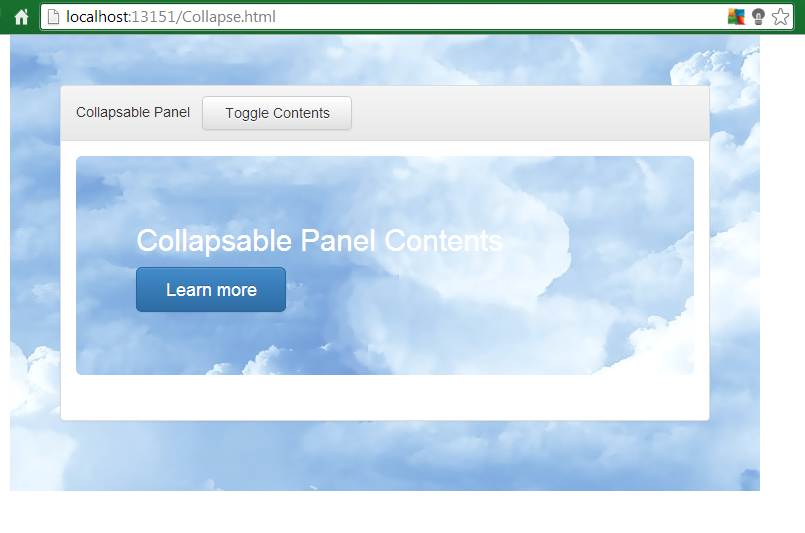
In just 5 minutes we'll build a responsive web page using a Collapsible Panel  with the Twitter Bootstrap , with no effort at all:


The Twitter Bootstrap can be reached & downloaded from the Bootstrap official site : Bootstrap :


Create an HTML web page or an MVC View, but make sure to load the CSS and the .js jQuery scripts in the page:


Now we'll keep COPYING-PASTING HTML markup from the Bootstrap official web site, to reuse it on our web page.

TWITTER BOOTSTRAP PANEL + COLLAPSE  


Go to the Bootstrap and copy the Panel markup :


Do the same with the Collapse markup at the Plugins tab of the Twitter Bootstrap web site:


Then paste it inside your MVC View or your HTML file, putting the button inside the Header of the Panel:


Save & refresh the web page :
Press the button to see the Panel appear, and press again to toggle it:


The panel starts growing, until it reaches its full size:


That's all!!  In this tutorial we've learned how to create a Collapsible Panel with the Twitter Bootstrap. There are more components, and there will be many more in the future. This tutorial does not intends to survey all components, but give you the tools for you to continue exploring them on your own.
Happy programming.....

כתב: כרמל שוורצמן