Showing posts with label Caching. Show all posts

Monday, January 20, 2014

Step By Step How to create an MVC View

         By Carmel Schvartzman


In this tutorial we'll learn how to create an MVC View for an Action method  in ASP.NET MVC 4
An MVC View is the responsible for rendering the html for the UI with the user: it is the Presentation level in the ModelViewController software pattern; if so , it is absolutely forbidden to include in it any bussiness logic (wich is holded into the MVC Model) or any application logic (coded inside the MVC Controllers), nor any data fetching(MVC Model responsability, sent via the Controllers).

By convention, the Views are stored inside subfolders of the View folder, named after the corresponding Controllers: then for instance, all the Views you create related to the AccountController will be placed inside the "Account" folder ("Views/Account"). The MVC framework will search a required View to be rendered, in the folder with the name of the Controller, and if it is not there, will search at the "Shared" subfolder. If you want a View to be shared among several Controllers, place it in the "Shared" folder.

A View is just a class called ViewPage: it inherits from the Page class and also implements the IViewDataContainer, in order to hold all the data sent by the Controllers inside its ViewDataDictionary. There is another useful collection named TempDataDictionary, similar to the former, with the difference that it persists ONLY between the current request and the next request (unless you mark the key to be persisted more than that, using the Keep() method). This is useful while passing data between Action methods, or in case of errors.

To create your own View, first let's create a new Controller called "NewViewController", and then add a View to the Index Action method. So right click over the Controllers folder, and add a new Controller:


Name it "NewViewController", and select the template "Empty MVC Controller":


Open the Controller file and find the "Index" Action method:


Right click on it and select the option "Add View":


On the dialog, let the name be "Index", select the "ASPX" View engine, and choose a master page:


The new created View holds several Contents , areas that will be embedded inside the Master page:


Return to the Index Action method, and add a key with a message to the ViewDataDictionary:


Do the same with the TempDataDictionary:


We have just set the Controller to send 2 strings to the View. Now we have to receive the data in the View, so add the folowing code inside the Content2:


We're done. Let's see how it works. Start the application without debugging (CTL - F5):


Now append to the address , the name we give to the Controller, "NewView". The MVC framework will route the request to the "Index" Action method of the "NewView" controller:

And we'll get the following web page rendered with the sent data:


In this tutorial we've learned how to create an MVC View for an Action method  in ASP.NET MVC 4, sending data via the ViewDataDictionary and the TempDataDictionary
That's all!! 
Happy programming.....


כתב: כרמל שוורצמן


Monday, January 13, 2014

Step By Step How to create an Action Method to Delete an Item

       By Carmel Schvartzman

In this tutorial we'll learn how to code an Action Method to  Delete an Item from an SQL SERVER database in ASP.NET MVC 4, in order to enable support to all CRUD (Create Retrieve Update Delete) operations in our application.
An Action method is a public method in a Controller, called in response to an user interaction. When a user send a request to an MVC app, the MVC framework find the appropriate Controller routing the request to it, and calling an Action method. This Action method returns an ActionResult object, which can be one of the following:
1. ViewResult : renders an MVC View
2. PartialViewResult : renders a section of a View
3. FileResult : returns binary data in the response
4. JsonResult : returns serialized Json object
5. JavaScriptResult : returns a script to be executed in the user browser
6. RedirectResult : redirects to another Action by URL
7. RedirectToRouteResult : redirects to another Action

There is also an EmptyResult, to return null.
Every public method in a Controller is suposed to be an Action. We can place private methods in a Controller, and if we need a public method that is not an Action, it must be decorated by an NonActionAttribute, which is translated by MVC to an 404 error (Page Not Found).

An Action method can handle different HTTP Verbs by using the AcceptVerbsAttribute, or the following more specific attributes:
1. HttpGetAttribute (for retrieving data)
2. HttpPostAttribute (for creating new entries)
3. HttpPutAttribute (for updating data)
4. HttpDeleteAttribute (for deleting)

When an Action method returns a View, we can pass data to the View using the ViewDataDictionary collection, this way:
                ViewData["Some Key"] = "Some Value";

Also , the View object supports getting any strongly-typed object as an argument:
                return View(someObject);

In the case an Action must pass data to another Action, this data is stored in a Session collection named TempDataDictionary:
               TempData["SomeKey"] = someObject;

This is useful while redirecting to another Action, or when sending a message to another Action in case of errors.


We'll add an Action Method to Delete an Item and save it in a database table  in ASP.NET MVC 4 , resulting in the following Delete View :


Let's say we have an MVC app connected to a database with an Entity Framework data model. First we'll create a DataRepository which supports retrieve and create actions. Create a new class BlogRepository:


In the new class, create a property with only the "get" access modifier to worry for creating the Data Model context:

Also, make the Repository implement the IDisposable interface, in order to dispose it after use:


Code the implementation of IDisposable:


We'll need also a method for retrieving ONLY ONE post to be deleted. Create the method, and get the required post from the store, not from Cache (if you try to use the post cached in memory, it will be detached from the data context):


Create a "Save" method to persist the data to the store:


And create an "Delete" method to delete a post:


The code will also remove the collection from the Cache, because the cache data is now obsolete, after the deletion.

Now we're ready to create our Controller and its Action methods. Add a new Controller named "BlogController":


The template to be used will be "MVC Controller with empty read/write actions":


Open the new Controller and find the "Delete" Action, and add the following code to render the details of the required post:


Now let's add a View to render the list. Choose creating a strongly-typed View, with the Blog Model:


The Scaffold Template must be "Delete" in this case.

The "Delete" View inside the "Blog" folder has been automatically created.
Open the new Controller and find the "Delete" Action, with "HttpPost" attribute decorating it:


Write the following code to delete a post using the Repository:


Notice that we're calling Save() after deleting the post. Also notice that we replaced the parameter type of the method, to a "Blog" type, which is received from the browser through an POST request.

Now let's see how our Action method works. Debug the project (F5), and browse to the "Blog" page .
Once there, select some entry and press "Delete":


We get the "Delete" View, to delete the Blog post:


Press the "Delete" button, to erase the entry.
The post has been deleted, and also it is reflected in the "Index" View, because the Cache has been refreshed:


In this tutorial we have learned how to create an Action Method to delete an item in a database table  in ASP.NET  MVC 4, using a Repository with caching support.

That's all!! 
Happy programming.....


כתב: כרמל שוורצמן

Sunday, January 12, 2014

Step By Step How to create an Action Method to Update an Item

        By Carmel Schvartzman

In this tutorial we'll learn how to code an Action Method to  Update an Item and persist it to an SQL SERVER database in ASP.NET MVC 4, in order to enable support to all CRUD (Create Retrieve Update Delete) operations in our application.
An Action method is a public method in a Controller, called in response to an user interaction. When a user send a request to an MVC app, the MVC framework find the appropriate Controller routing the request to it, and calling an Action method. This Action method returns an ActionResult object, which can be one of the following:
1. ViewResult : renders an MVC View
2. PartialViewResult : renders a section of a View
3. FileResult : returns binary data in the response
4. JsonResult : returns serialized Json object
5. JavaScriptResult : returns a script to be executed in the user browser
6. RedirectResult : redirects to another Action by URL
7. RedirectToRouteResult : redirects to another Action

There is also an EmptyResult, to return null.
Every public method in a Controller is suposed to be an Action. We can place private methods in a Controller, and if we need a public method that is not an Action, it must be decorated by an NonActionAttribute, which is translated by MVC to an 404 error (Page Not Found).

An Action method can handle different HTTP Verbs by using the AcceptVerbsAttribute, or the following more specific attributes:
1. HttpGetAttribute (for retrieving data)
2. HttpPostAttribute (for creating new entries)
3. HttpPutAttribute (for updating data)
4. HttpDeleteAttribute (for deleting)

When an Action method returns a View, we can pass data to the View using the ViewDataDictionary collection, this way:
                ViewData["Some Key"] = "Some Value";

Also , the View object supports getting any strongly-typed object as an argument:
                return View(someObject);

In the case an Action must pass data to another Action, this data is stored in a Session collection named TempDataDictionary:
               TempData["SomeKey"] = someObject;

This is useful while redirecting to another Action, or when sending a message to another Action in case of errors.


We'll add an Action Method to Update an Item and save it in a database table  in ASP.NET MVC 4 , resulting in the following Edit View :


Let's say we have an MVC app connected to a database with an Entity Framework data model. First we'll create a DataRepository which supports retrieve and create actions. Create a new class BlogRepository:


In the new class, create a property with only the "get" access modifier to worry for creating the Data Model context:

Also, make the Repository implement the IDisposable interface, in order to dispose it after use:


Code the implementation of IDisposable:


We'll need also a method for retrieving ONLY ONE post to be updated. Create the method, and first of all try to get the required post from Cache:


If the posts's Cache is empty, get the data from database and refresh the Cache:


Create a "Save" method to persist the data to the store:


And create an "Update" method to edit a post:


The code will also remove the collection from the Cache, because the cache data is now obsolete.


Now we're ready to create our Controller and its Action methods. Add a new Controller named "BlogController":


The template to be used will be "MVC Controller with empty read/write actions":


Open the new Controller and find the "Edit" Action:


Now let's add a View to render the list:


Choose creating a strongly-typed View, with the Blog Model:


The Scaffold Template must be "Edit" in this case.

The "Edit" View inside the "Blog" folder has been automatically created.
Open the new Controller and find the "Edit" Action, with "HttpPost" attribute decorating it:


Write the following code to update a post using the Repository:


Notice that we're calling Save() after creating the new post. Also notice that we replaced the parameter type of the method, to a "Blog" type, which is received from the browser through an POST request.

Now let's see how our Action method works. Debug the project (F5), and browse to the "Blog" page .
Once there, select some entry and press "Edit":


We get the "Edit" View, to input the new data for the Blog post:


Enter some input into the form, and press Save:


The post has been updated, and also it is reflected in the "Index" View, because the Cache has been refreshed:


In this tutorial we have learned how to create an Action Method to update an item in a database table  in ASP.NET  MVC 4, using a Repository with caching support.

That's all!! 
Happy programming.....


כתב: כרמל שוורצמן

Wednesday, January 8, 2014

Step By Step How to create an Action Method to Create a New Item

        By Carmel Schvartzman


In this tutorial we'll learn how to code an Action Method to create a new item and persist it to an SQL SERVER database in ASP.NET MVC 4, in order to enable support to all CRUD (Create Retrieve Update Delete) operations in our application.
An Action method is a public method in a Controller, called in response to an user interaction. When a user send a request to an MVC app, the MVC framework find the appropriate Controller routing the request to it, and calling an Action method. This Action method returns an ActionResult object, which can be one of the following:
1. ViewResult : renders an MVC View
2. PartialViewResult : renders a section of a View
3. FileResult : returns binary data in the response
4. JsonResult : returns serialized Json object
5. JavaScriptResult : returns a script to be executed in the user browser
6. RedirectResult : redirects to another Action by URL
7. RedirectToRouteResult : redirects to another Action

There is also an EmptyResult, to return null.
Every public method in a Controller is suposed to be an Action. We can place private methods in a Controller, and if we need a public method that is not an Action, it must be decorated by an NonActionAttribute, which is translated by MVC to an 404 error (Page Not Found).

An Action method can handle different HTTP Verbs by using the AcceptVerbsAttribute, or the following more specific attributes:
1. HttpGetAttribute (for retrieving data)
2. HttpPostAttribute (for creating new entries)
3. HttpPutAttribute (for updating data)
4. HttpDeleteAttribute (for deleting)

When an Action method returns a View, we can pass data to the View using the ViewDataDictionary collection, this way:
                ViewData["Some Key"] = "Some Value";

Also , the View object supports getting any strongly-typed object as an argument:
                return View(someObject);

In the case an Action must pass data to another Action, this data is stored in a Session collection named TempDataDictionary:
               TempData["SomeKey"] = someObject;

This is useful while redirecting to another Action, or when sending a message to another Action in case of errors.


We'll add an Action Method to add a new item to a database table  in ASP.NET MVC 4 , resulting in the following Create View :


Let's say we have an MVC app connected to a database with an Entity Framework data model. First we'll create a DataRepository which supports retrieve and create actions. Create a new class BlogRepository:


In the new class, create a property with only the "get" access modifier to worry for creating the Data Model context:


Create a "Save" method to persist the data to the store:


And create an "Create" method to add a new post:


The code will also remove the collection from the Cache, because the cache data is now obsolete:


Now we're ready to create our Controller and its Action methods. Add a new Controller named "BlogController":


The template to be used will be "MVC Controller with empty read/write actions":


Open the new Controller and find the "Create" Action:


Now let's add a View to render the list:


Choose creating a strongly-typed View, with the Blog Model:


The Scaffold Template must be "Create" in this case:


The "Create" View inside the "Blog" folder has been automatically created:


In order to add a new link to the Menu, open the _Layout.cshtml file and add the following entry:


Actually, we don't need to add it, because we can also click the prebuilt "Create New" link:


Open the new Controller and find the "Create" Action, with "HttpPost" attribute decorating it:


Write the following code to create a new post using the Repository:


Notice that we're calling Save() after creating the new post. Also notice that we replaced the parameter type of the method, to a "Blog" type, which is received from the browser through an POST request.

Now let's see how our Action method works. Debug the project (F5), and browse to the "Create" page :


We get the "Create" View, to input the new Blog post:


Enter some input into the form, and press Save:


Now let's check the database. Indeed, the post has been persisted:


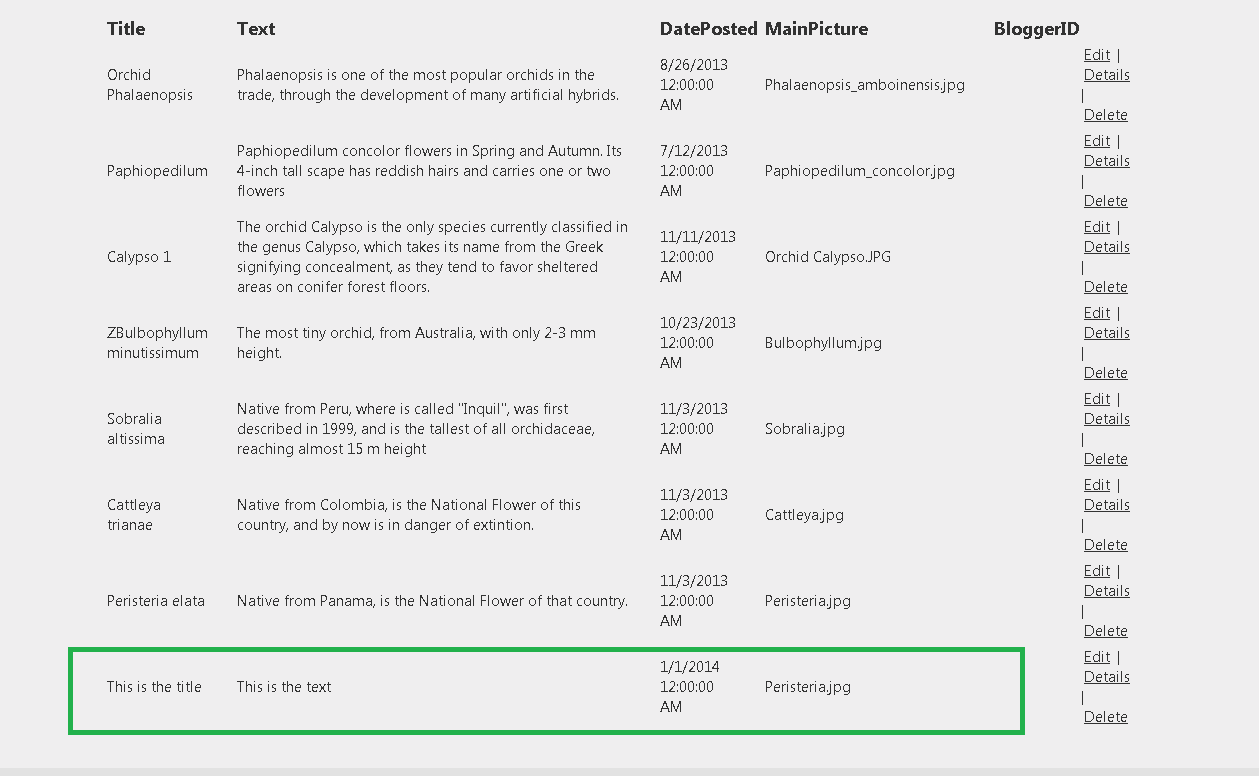
And also it is reflected in the "Index" View, because the Cache has been refreshed:


In this tutorial we have learned how to create an Action Method to add a new item to a database table  in ASP.NET , MVC 4, using a Repository with caching support.

That's all!! 
Happy programming.....


כתב: כרמל שוורצמן